Latest version is 2.13.5, released on 5 June 2024.
Search Meter is a WordPress plugin that helps you keep your blog focused on what your visitors want to read. It does this by keeping track of what your visitors are searching for.
If you have a Search box on your blog, Search Meter automatically records what people are searching for — and whether they are finding what they want. Search Meter’s admin interface shows you what people have been searching for in the last couple of days, and in the last week or month. It also shows you which searches have been unsuccessful. If people search your blog and get no results, they’ll probably go elsewhere. With Search Meter, you’ll be able to find out what people are searching for, and give them what they want by creating new posts on those topics.
Search Meter includes a Dashboard widget so you can see the last week of searches right on your WordPress Dashboard.
You can also show your readers what the most popular searches are. The Popular Searches widget displays a configurable list of recent popular successful search terms on your blog, with each term hyperlinked to the actual search results. There’s also a Recent Searches widget, which simply displays the most recent searches. If you are happy to edit your theme, both of these functions are also available as template tags.
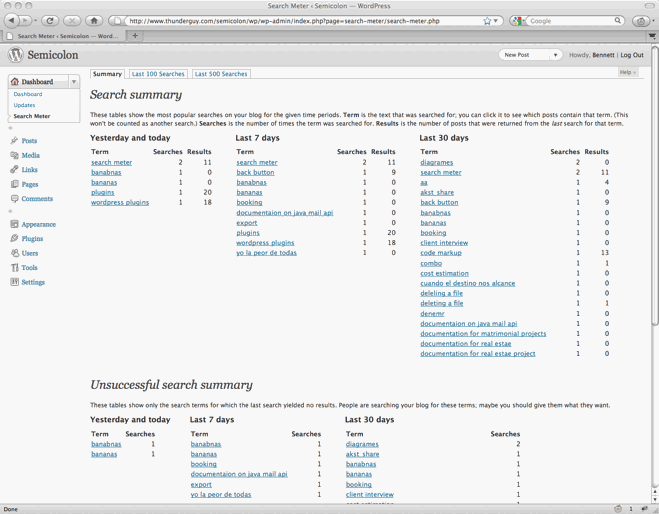
Search Meter installs easily and requires no configuration. Just install it, activate it, and it starts tracking your visitors’ searches. Here’s a screenshot of the Search Meter dashboard, showing some of the reports you’ll get.
Compatibility
Search Meter is updated as necessary whenever new WordPress versions come out. The Search Meter page at the WordPress Plugins Directory has the latest compatibility information.
Install
Log in to your WordPress administration console. Under Plugins, select Add New. Type Search Meter in the box and the rest should be easy.
You can also download the Search Meter files from the WordPress Plugin Directory. You can download older version of the plugin, or check the development version for the latest unreleased goodies.
View Statistics
To see your search statistics, Log in to WordPress Admin, go to the Dashboard section and click Search Meter. You’ll see the most popular searches in the last day, week and month. Click “Last 100 Searches” or “Last 500 Searches” to see lists of all recent searches.
Manage Statistics
There are a couple of management option available if you go to the Settings section and click Search Meter. Use the Reset Statistics button to clear all past search statistics; Search Meter will immediately start gathering fresh statistics. If you’re technically-minded, you might want to check the “Keep detailed information” checkbox to make Search Meter save technical information about every search (the information is taken from the HTTP headers).
Popular and Recent Searches
The Popular Searches widget displays a list of the most popular successful search terms on your blog during the last 30 days. The Recent Searches widget displays a simple list of the most recent successful search terms. In both cases, the search terms in the lists are hyperlinked to the actual search results; readers can click the search term to show the results for that search. Also, you can configure the title and the maximum number of searches that each widget will display.
To add these widgets to your sidebar, log in to WordPress Admin, go to the Appearance section and click Widgets. You can drag the appropriate widget to the sidebar of your choice, and configure the title and the number of searches to display.
Widget support depends on the version of WordPress and the theme you’re using. In some cases you will not be able to use the widgets. In any case, you can always use the Search Meter template tags to display the same information. You’ll need to edit your theme to use them.
The sm_list_popular_searches() template tag displays a list of the 5 most popular successful search terms on your blog during the last 30 days. Each term is a hyperlink; readers can click the search term to show the results for that search. Here are some examples of using this template tag.
sm_list_popular_searches()
Show a simple list of the 5 most popular recent successful search terms, hyperlinked to the actual search results.
sm_list_popular_searches('<h2>Popular Searches</h2>')
Show the list as above, with the heading “Popular Searches”. If there have been no successful searches, then this tag displays no heading and no list.
sm_list_popular_searches('<li><h2>Popular Searches</h2>', '</li>')
Show the headed list as above; this form of the tag should be used in the default WordPress theme. Put it in the sidebar.php file.
sm_list_popular_searches('<code><li><h2>Popular Searches</h2>', '</li>', 10)
This is the same as the above, but it shows the 10 most popular searches.
sm_list_recent_searches()
Show a simple list of the 5 most recent successful search terms, hyperlinked to the actual search results. You can also use the same options as for the sm_list_popular_searches tag.
If you add these to your theme, wrap them in a function_exists call so your theme won’t break if you deactivate Search Meter. It should look something like this:
if (function_exists('sm_list_popular_searches')) {
    sm_list_popular_searches();
}
Problems, questions or requests?
If you use the Recent Searches or Popular Searches widgets, you may be affected by a WordPress bug that stops multi-word search links from working. For more information and a way to fix the problem, see my Search Fixer plugin to ensure the search links always work.
Contribute
The source code is maintained on the Search Meter github repository. You know the drill: fork, hack, send a pull request, and bask in the warm glow of satisfaction that is open source.
If you find any problems, please let me know by leaving a comment at the bottom of this page. You can also leave a comment if you have any questions about how it works, or if you would like to request a feature.
I write these WordPress plugins because I enjoy doing it, but it does take up a lot of my time. If you think this plugin is useful, please consider donating some appropriate amount.
Click here to donate using a credit card or PayPal.
 Send Bitcoins to address
1542gqyprvQd7gwvtZZ4x25cPeGWVKg45x
Full WordPress plugin list
- Code Markup — Quickly paste code samples into your posts -- you can even include HTML markup in the code sample.
- Evermore — Automatically display a short preview of your posts on the home page and other multiple-post pages, along with a link to the full post.
- FixBack — Ensure trackbacks and pingbacks are sent with the correct link back to your blog.
- Less — Less is no more. It has been renamed to Seemore and moved to its own Seemore plugin page.
- Plaintext — Allow your readers to download source files (e.g. PHP, HTML, ASP) as plain text.
- Safe Title — Use HTML in post titles in the default WordPress theme (or any other theme).
- Search Meter — Find out what people are searching for on your blog, so you can write what your visitors want to read.
- Seemore — Change the (more...) link so it jumps to the full post, not just the part after the link.
- Top Cat — Specify a main category for your posts, and use template tags to display posts differently according to their main category.
Watch latest movies ( Bachchan Pandey, The Kashmir Files, Jalsa, Radhy Shyam, GanguBai Kathiawadi, Spiderman and Battman on HDMOVIES300LIVE in HD Quality
Hello, are you still working on the plugin and will it be updated?
very informative post love to share it
Hi thanks for this useful plugin
do you work on it?
i never used this plugin but i really liked the information you have provided
Imlie (transl. Tamarind) is an Indian Hindi-language television drama series that premiered on 16 November 2020
The lives of two mothers from different backgrounds takes a turn after their daughters get swapped accidently at the time of birth.
that is very good information you have provided keep it up
i did not used this plugin at all, please let me know if i can use youst seo with rank math
Thanks for this WordPress plugin please let me know for more plugins
Let me questions.
(1) Is it a form that accumulates in the database, or
(2) Does text data accumulate in another place?
(3) If the csv is not downloaded, will the past minutes disappear?
The form data is saved in the database. Summary search data is saved permanently. For individual searches, we just keep the last 500 searches.
Search Meter provides insights on popular and unsuccessful searches, facilitating better user engagement and content optimization.
Hello, Before we saw als the name of a login user in the details tab of the last 100 searches, at this moment (after update wordpress and the search meter plugin, we only see the IP adress of the user.
How can we fix this?
A setting lets us save detailed info. I have that checked, hoping to get IPs to report to ISPs of stupid hackers trying to do SQL inectect and stuff. Where do I find the detail? Thanks.
@Xeno, go to the Search Meter dashboard and click “Last 100 Searches” or “Last 500 Searches”. The click “Show Details”.