Latest version is 2.14.1, released on 3 December 2025.
Search Meter is a WordPress plugin that helps you keep your site focused on what your visitors want to read. It does this by keeping track of what your visitors are searching for.
If you have a Search box on your site, Search Meter automatically records what people are searching for — and whether they are finding what they want. Search Meter’s admin interface shows you what people have been searching for in the last couple of days, and in the last week or month. It also shows you which searches have been unsuccessful. If people search your site and get no results, they’ll probably go elsewhere. With Search Meter, you’ll be able to find out what people are searching for, and give them what they want by creating new posts on those topics.
Search Meter includes a Dashboard widget so you can see the last week of searches right on your WordPress Dashboard.
You can also show your readers what the most popular searches are. The Popular Searches block displays a configurable list of recent popular successful search terms on your site, with each term hyperlinked to the actual search results. There’s also a Recent Searches block, which simply displays the most recent searches. For older WordPress themes or installations, these functions are also available as widgets and template tags.
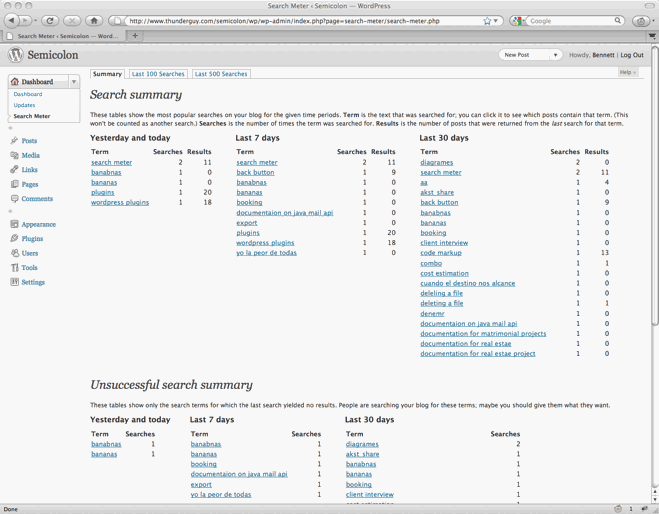
Search Meter installs easily and requires no configuration. Just install it, activate it, and it starts tracking your visitors’ searches. Here’s a screenshot of the Search Meter dashboard, showing some of the reports you’ll get.
Compatibility
Search Meter is updated as necessary whenever new WordPress versions come out. The Search Meter page at the WordPress Plugins Directory has the latest compatibility information.
Install
Log in to your WordPress administration console. Under Plugins, select Add New. Type Search Meter in the box and the rest should be easy.
You can also download the Search Meter files from the WordPress Plugin Directory. You can download older version of the plugin, or check the development version for the latest unreleased goodies.
View Statistics
To see your search statistics, Log in to WordPress Admin, go to the Dashboard section and click Search Meter. You’ll see the most popular searches in the last day, week and month. Click “Last 100 Searches” or “Last 500 Searches” to see lists of all recent searches.
Manage Statistics
There are a couple of management option available if you go to the Settings section and click Search Meter. Use the Reset Statistics button to clear all past search statistics; Search Meter will immediately start gathering fresh statistics. If you’re technically-minded, you might want to check the “Keep detailed information” checkbox to make Search Meter save technical information about every search (the information is taken from the HTTP headers).
Popular and Recent Searches
The Popular Searches block displays a list of the most popular successful search terms on your site during the last 30 days. The Recent Searches block displays a simple list of the most recent successful search terms. In both cases, the search terms in the lists are hyperlinked to the actual search results; readers can click the search term to show the results for that search. For each block you can configure the text colour and size, the title, and the maximum number of searches to display.
To add these blocks to your page, log in to WordPress, then go to the page you want to add them to. Click Edit Site to go to the page editor. You can add a block, and you’ll be able to add the Popular Searches and Recent Searches blocks, and customize them as you wish.
The blocks only display successful searches, so they will only display words that actually appear in your site. If you still want to prevent some of these words appearing in the blocks, you can add search filter words in the Search Meter settings page.
The title will be a standard size and the same colour as the rest of the block. If you want its appearance to be different, you can leave it blank to omit it. Then you can just add a Heading block above the Search Meter block, and configure it however you like.
If your WordPress installation does not support Blocks, then you should be able to use the Search Meter widgets instead — they work pretty much the same as the blocks. And if you’re prepared to edit your theme files, you can always use the Search Meter template tags.
Template Tags
It’s better to use the Blocks or Widgets if you can. But if you really want (or need) to use the template tags, here are the details.
The sm_list_popular_searches() template tag displays a list of the 5 most popular successful search terms on your site during the last 30 days. Each term is a hyperlink; readers can click the search term to show the results for that search. Here are some examples of using this template tag.
sm_list_popular_searches()
Show a simple list of the 5 most popular recent successful search terms, hyperlinked to the actual search results.
sm_list_popular_searches('<h2>Popular Searches</h2>')
Show the list as above, with the heading “Popular Searches”. If there have been no successful searches, then this tag displays no heading and no list.
sm_list_popular_searches('<li><h2>Popular Searches</h2>', '</li>')
Show the headed list as above; this form of the tag should be used in the default WordPress theme. Put it in the sidebar.php file.
sm_list_popular_searches('<code><li><h2>Popular Searches</h2>', '</li>', 10)
This is the same as the above, but it shows the 10 most popular searches.
sm_list_recent_searches()
Show a simple list of the 5 most recent successful search terms, hyperlinked to the actual search results. You can also use the same options as for the sm_list_popular_searches tag.
If you add these to your theme, wrap them in a function_exists call so your theme won’t break if you deactivate Search Meter. It should look something like this:
if (function_exists('sm_list_popular_searches')) {
    sm_list_popular_searches();
}
Problems, questions or requests?
If your WordPress installation is (very) old, you may be affected by a WordPress bug that stops multi-word search links from working in Recent Searches or Popular Searches. For more information and a way to fix the problem, see my Search Fixer plugin to ensure the search links always work.
Contribute
The source code is maintained on the Search Meter github repository. You know the drill: fork, hack, send a pull request, and bask in the warm glow of satisfaction that is open source.
If you find any problems, please let me know by leaving a comment at the bottom of this page. You can also leave a comment if you have any questions about how it works, or if you would like to request a feature.
I write these WordPress plugins because I enjoy doing it, but it does take up a lot of my time. If you think this plugin is useful, please consider donating some appropriate amount.
Click here to donate using a credit card or PayPal.
 Send Bitcoins to address
1542gqyprvQd7gwvtZZ4x25cPeGWVKg45x
Full WordPress plugin list
- Code Markup — Quickly paste code samples into your posts -- you can even include HTML markup in the code sample.
- Evermore — Automatically display a short preview of your posts on the home page and other multiple-post pages, along with a link to the full post.
- FixBack — Ensure trackbacks and pingbacks are sent with the correct link back to your blog.
- Less — Less is no more. It has been renamed to Seemore and moved to its own Seemore plugin page.
- Plaintext — Allow your readers to download source files (e.g. PHP, HTML, ASP) as plain text.
- Safe Title — Use HTML in post titles in the default WordPress theme (or any other theme).
- Search Meter — Find out what people are searching for on your blog, so you can write what your visitors want to read.
- Seemore — Change the (more...) link so it jumps to the full post, not just the part after the link.
- Top Cat — Specify a main category for your posts, and use template tags to display posts differently according to their main category.
Thanks for the great plugin – I made 2 small changes to it, though –
1) added ,1 to the ORDER BY in tguy_sm_stats_table so that the terms would be alphabetized after they were sorted by decreasing hits. I’d noticed that I was showing different results between the 3 queries (1 day, 7 days, 30 days), and just wanted to tidy them up a bit when they all held the same results.
2) I moved the plugin from the options page to the dashboard, as I felt that since this was an information-only page and didn’t have any options to set that it would be better placed with other information-only pages.
function tguy_sm_add_admin_page() {

//	if (function_exists('add_options_page')) {

//		add_options_page('Search Meter', 'Search Meter', 8, basename(__FILE__), 'tguy_sm_options_page');

//	}

// 09/06/05 GK - move it from options page to dashboard, since it's an informational display only

	add_submenu_page('index.php', 'Search Meter', 'Search Meter',1, __FILE__, 'tguy_sm_options_page');
}
Thanks again!
Kaufman, thanks very much for your comments. Your
order bytweak is simple but effective — I should have thought of it myself. And I did consider putting the Search Meter stats in the Dashboard, but I personally don’t like using the Dashboard because the main Dashboard page takes too long to load! (It’s all those RSS feeds I suppose.)However, I think you are right; it is a more logical place to put it. I know there are plugins that can change the Dashboard main page so it’s not so slow — maybe I should use one.
I have updated the plugin to incorporate these suggestions. I’ve credited you in the source, so if Search Meter becomes famous then you will too!
Cool, thanks, Bennett!
I agree about the dashboard taking too long to load – I’ve gotten to where I just have bookmarks for the different sections that I need – that way I rarely have to actually HIT the dashboard itself. (For instance, I also use a modified version of Short-Stat, which sits on the dashboard as well. ) Perhaps an upcoming WP release would allow us to turn off the RSS feeds. I’ve seen some plugins to do that, also, but it looks like you have to modify the page itself. I’m still rather new to WP, so I don’t want to change too much of the core pages as I’m not yet clear on how those modifications will carry over during WP upgrades.
Hi Bennett,
The Search Meter is a great tool to have, it’s one of the first plugins I installed. I do have 1 question though: Can we purge search results and start over?
And as to your aversion to dashboard because of all the feeds, you should consider installing this hack, it makes the dashboard a lot more useful without all the fat: WordPress 1.5 (1.5.1 and 1.5.2) Hack: How to trim the fat resource hogging Admin DashBoard (Version 2)
[Edited on 18 September by Bennett: edited the link above to fit on the screen]
Darrell, that’s an excellent idea. Currently the only way to purge the stats is to wait 31 days for al the stats to age. So you need to be patient. 🙂
However, I realise that in today’s fast-moving world we need instant results, so I will add a Search Meter options page with a “Reset statistics” button. I very much hope I will have time to do this sometime this coming week.
Hi Bennet,
Firstly, great plugin – it’s going to be really handy.
One question I have, is how easy do you think it would be to make it so that you can list all the succesfull most recent searches made on the site in your sidebar and link through to those results?
Where is the data pulled from? Is there a simple output query I could add to the sidebar to get the list?
Cheers
Oliver
Oliver, I think that would be fairly easy. Search Meter saves search information to its own database table. I’ll see if I can find the time to add a “popular searches” template tag — a nice idea.
One little suggestion : replace every <? with <?php and avoid PHP’s short syntax like <?=$a?> to ensure maximum compatibility on any PHP enabled webserver.
Thanks Ozh, that is something I should really do. I am probably not as careful as I should be about this sort of thing — I do avoid PHP 5+ and MySQL 4.1+ features, but other than that, the code only works if you’re fairly current and have all the bells and whistles on (like short PHP tags). I have added this task to my steadily lengthening list.
Bennet, that would be great.
I’m looking through the db for my site now and can see the searches in wp_bas_searches, but I don’t see any way of identifying which of these searches were succesful.
Also, my only concern with adding the recent searches to the site would be if people started to use cuss words to search the site – clearly I don’t wan’t those displayed 😉
How easy would it be to add a stop-list?
If you need any help on this, give me a shout… I’m not the best coder (For sure), but I can help out here and ther 😉
Thanks for the input, Oliver. I’m just testing a new version of Search Meter, which has a few improvements, including a “Popular Searches” template tag and a Reset button. (By the way, successful searches are represented by rows with last_hits > 0.) I will update Search Meter to the new version in the next day or two.
You won’t need to worry about the Popular Searches list showing rude words — it will only display searches that were successful, so it will only show up words that actually occur in your blog. So if you never use the word “horsefeathers” in your blog, then it will never show up as a Popular Search no matter how many times people search for it. (After all, there’s no point showing searches that don’t yield any results.)
If you need any help with safe “swear” words to use on your blog, I have posted a useful list of child-safe swear words. Please feel free to add to the list!
I have updated Search Meter to version 1.1, incorporating good suggestions from Darrell, Oliver and Ozh. Thanks for your help.
Bennet – that is awesome – Really nice work man – thanks very much indeed for those additions…
If you need any graphic work in return in the future, just give me a shout and I’ll help you out for sure…
Cheers
Ol