Latest version is 2.14.1, released on 3 December 2025.
Search Meter is a WordPress plugin that helps you keep your site focused on what your visitors want to read. It does this by keeping track of what your visitors are searching for.
If you have a Search box on your site, Search Meter automatically records what people are searching for — and whether they are finding what they want. Search Meter’s admin interface shows you what people have been searching for in the last couple of days, and in the last week or month. It also shows you which searches have been unsuccessful. If people search your site and get no results, they’ll probably go elsewhere. With Search Meter, you’ll be able to find out what people are searching for, and give them what they want by creating new posts on those topics.
Search Meter includes a Dashboard widget so you can see the last week of searches right on your WordPress Dashboard.
You can also show your readers what the most popular searches are. The Popular Searches block displays a configurable list of recent popular successful search terms on your site, with each term hyperlinked to the actual search results. There’s also a Recent Searches block, which simply displays the most recent searches. For older WordPress themes or installations, these functions are also available as widgets and template tags.
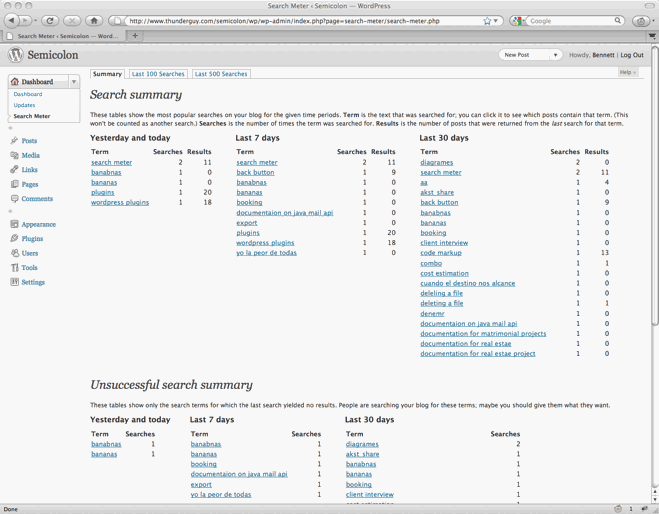
Search Meter installs easily and requires no configuration. Just install it, activate it, and it starts tracking your visitors’ searches. Here’s a screenshot of the Search Meter dashboard, showing some of the reports you’ll get.
Compatibility
Search Meter is updated as necessary whenever new WordPress versions come out. The Search Meter page at the WordPress Plugins Directory has the latest compatibility information.
Install
Log in to your WordPress administration console. Under Plugins, select Add New. Type Search Meter in the box and the rest should be easy.
You can also download the Search Meter files from the WordPress Plugin Directory. You can download older version of the plugin, or check the development version for the latest unreleased goodies.
View Statistics
To see your search statistics, Log in to WordPress Admin, go to the Dashboard section and click Search Meter. You’ll see the most popular searches in the last day, week and month. Click “Last 100 Searches” or “Last 500 Searches” to see lists of all recent searches.
Manage Statistics
There are a couple of management option available if you go to the Settings section and click Search Meter. Use the Reset Statistics button to clear all past search statistics; Search Meter will immediately start gathering fresh statistics. If you’re technically-minded, you might want to check the “Keep detailed information” checkbox to make Search Meter save technical information about every search (the information is taken from the HTTP headers).
Popular and Recent Searches
The Popular Searches block displays a list of the most popular successful search terms on your site during the last 30 days. The Recent Searches block displays a simple list of the most recent successful search terms. In both cases, the search terms in the lists are hyperlinked to the actual search results; readers can click the search term to show the results for that search. For each block you can configure the text colour and size, the title, and the maximum number of searches to display.
To add these blocks to your page, log in to WordPress, then go to the page you want to add them to. Click Edit Site to go to the page editor. You can add a block, and you’ll be able to add the Popular Searches and Recent Searches blocks, and customize them as you wish.
The blocks only display successful searches, so they will only display words that actually appear in your site. If you still want to prevent some of these words appearing in the blocks, you can add search filter words in the Search Meter settings page.
The title will be a standard size and the same colour as the rest of the block. If you want its appearance to be different, you can leave it blank to omit it. Then you can just add a Heading block above the Search Meter block, and configure it however you like.
If your WordPress installation does not support Blocks, then you should be able to use the Search Meter widgets instead — they work pretty much the same as the blocks. And if you’re prepared to edit your theme files, you can always use the Search Meter template tags.
Template Tags
It’s better to use the Blocks or Widgets if you can. But if you really want (or need) to use the template tags, here are the details.
The sm_list_popular_searches() template tag displays a list of the 5 most popular successful search terms on your site during the last 30 days. Each term is a hyperlink; readers can click the search term to show the results for that search. Here are some examples of using this template tag.
sm_list_popular_searches()
Show a simple list of the 5 most popular recent successful search terms, hyperlinked to the actual search results.
sm_list_popular_searches('<h2>Popular Searches</h2>')
Show the list as above, with the heading “Popular Searches”. If there have been no successful searches, then this tag displays no heading and no list.
sm_list_popular_searches('<li><h2>Popular Searches</h2>', '</li>')
Show the headed list as above; this form of the tag should be used in the default WordPress theme. Put it in the sidebar.php file.
sm_list_popular_searches('<code><li><h2>Popular Searches</h2>', '</li>', 10)
This is the same as the above, but it shows the 10 most popular searches.
sm_list_recent_searches()
Show a simple list of the 5 most recent successful search terms, hyperlinked to the actual search results. You can also use the same options as for the sm_list_popular_searches tag.
If you add these to your theme, wrap them in a function_exists call so your theme won’t break if you deactivate Search Meter. It should look something like this:
if (function_exists('sm_list_popular_searches')) {
    sm_list_popular_searches();
}
Problems, questions or requests?
If your WordPress installation is (very) old, you may be affected by a WordPress bug that stops multi-word search links from working in Recent Searches or Popular Searches. For more information and a way to fix the problem, see my Search Fixer plugin to ensure the search links always work.
Contribute
The source code is maintained on the Search Meter github repository. You know the drill: fork, hack, send a pull request, and bask in the warm glow of satisfaction that is open source.
If you find any problems, please let me know by leaving a comment at the bottom of this page. You can also leave a comment if you have any questions about how it works, or if you would like to request a feature.
I write these WordPress plugins because I enjoy doing it, but it does take up a lot of my time. If you think this plugin is useful, please consider donating some appropriate amount.
Click here to donate using a credit card or PayPal.
 Send Bitcoins to address
1542gqyprvQd7gwvtZZ4x25cPeGWVKg45x
Full WordPress plugin list
- Code Markup — Quickly paste code samples into your posts -- you can even include HTML markup in the code sample.
- Evermore — Automatically display a short preview of your posts on the home page and other multiple-post pages, along with a link to the full post.
- FixBack — Ensure trackbacks and pingbacks are sent with the correct link back to your blog.
- Less — Less is no more. It has been renamed to Seemore and moved to its own Seemore plugin page.
- Plaintext — Allow your readers to download source files (e.g. PHP, HTML, ASP) as plain text.
- Safe Title — Use HTML in post titles in the default WordPress theme (or any other theme).
- Search Meter — Find out what people are searching for on your blog, so you can write what your visitors want to read.
- Seemore — Change the (more...) link so it jumps to the full post, not just the part after the link.
- Top Cat — Specify a main category for your posts, and use template tags to display posts differently according to their main category.
Finewine, the behaviour you describe is impossible. 🙂 Resetting the stats deletes all information from the Search Meter database, so maybe the page you saw is being cached somehow. If the problem does not go away, I will investigate further. I’d need to know the version of WordPress you’re using, and also the other plugins you have installed (just copy and paste from your plugin admin screen). Let me know how you go.
Wow, great plugin. That’s exactly what I was looking for, but I do have some suggestions for you:
1. I’d like to export the data into MSExcel format, or some other file where I would be able to work with it (making graphs, sorting…). (Excel would be perfect)
2. Mostly, I’m not typing any text in the article, I’m using just the comments. I would be fine if the Search Meter could find the results in comments too.
3. Well and the last thing, what about making the word appear in the search results. You know, the way google does it. I know there is a plug-in that does that, but it didn’t work for me because I need the comments to be searched. And the other problem was that was using blix theme, which was not compatible with the plug-in.
I like this plug-in very much, but please have a look at the issues I experienced:
1. I have two blogs, one uses WP 1.5, the other WP 2.0. In WP 2.0, when I reset my statistics, I get a totally blank page. That doesn’t happen in WP 1.5. I have to hit the back button to see something again, and when I check to see if the statistics were reset, they were, it’s just that blank page that’s strange.
2. What exactly does the statistic “Searches” represent? I’m wondering because I searched for terms that are not in my Blog, and I consistenly get an arbitrary number in the search column. My first guess was that “Searches” represented the number of times a term/phrase was searched for. However, I get a result of 2+ “Searches” on the first try of the most unlikely and obscure test searches. My second guess was that “Searches” represents the number of posts the program looked through, but the number of posts I have don’t match the statistics. This happens in both versions of WordPress.
Search Meter rocks!
Thanks for the plugin.
Rimmon, thanks for those suggestions. the suggestion of importing the data into Excel is interesting, but I would prefer to keep Search Meter simple.If you wanted to manipulate the data then you’d probably want more detailed data than Search Meter can currently provide.
Your other suggestions are unrelated to Search Meter — remember, Search Meter simply keeps track of what visitors search for; it does not carry out the searches itself.
Mark, unfortunately I have never experienced the “blank screen” problem with WordPress 1.5 or 2, so I don’t have much to go on there. But you might be able to help me fix it. Read on…
As for the search count, your first guess was correct: “Searches” is the number of times the given phrase was searched for. A few other people have reported that their searchcounts are too high, and I am investigating this mystery. You could help by sending me a list of the other plugins you are using on your blog.
Hi I love how work this plugin.
The only one thin I ask you , or anyone, is to write me
a correct code to insert in my sidebar.php to display
searches on my blog.
btw, also from dashboard is very useful this plug !
but i wish to show also to other peoples…
so please help me!
thank you
( because if I copy and paste the code above , not appear the result I wish…)
I would like to use your search-meter plugin, but get the following message when I upload it to my WordPress plugins directory (wp-content/plugins):
Warning: Unexpected character in input: ‘\’ (ASCII=92) state=1 in /homepages/45/d155489769/htdocs/wordpress/wp-content/plugins/search-meter.php on line 2
Parse error: parse error, unexpected T_STRING in /homepages/45/d155489769/htdocs/wordpress/wp-content/plugins/search-meter.php on line 2
What am I doing wrong? Thanks.
Jeff, that’s quite strange. The first few lines of the search-meter.php fi;le shoud look like this:
If they don’t look like this, then please download the file again (for best results, right-click or control-click on the link and select “Save as…” or similar). Let me know how you get on.
I love this plugin, it looks awesome. One problem with it though. I have the ‘nice search’ plugin enabled by MarkJ and it seems that when I do an initial search with /search/testpostthatisntfound, it returns that it has been for 3 times already, and then continues to increment by 1 after that. Happens for all my searches, successful or not. Any thoughts?